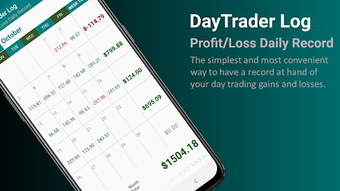

Download DayTrader Log – Day-Trading Record Keeping, Finance Tool, Trading Tracker
Overview
DayTrader Log is a specialized mobile application designed to streamline the process of tracking day-trading activities. Developed by VQDA Project, the software falls under the Business & Productivity category, specifically within Finance. Its primary purpose is to provide users with a straightforward method for recording gains, losses, and trade details such as date, time, and transaction specifics.
The app aims to support traders in maintaining accurate records, enabling better performance analysis and strategy refinement over time. It is tailored for individuals engaged in day trading, including both beginners seeking to establish disciplined tracking habits and experienced traders who value efficiency and clarity in their data logging. The software is available at no cost, enhancing its accessibility across different user levels.
While the developer did not provide additional system requirements, the app is designed for Android platforms. Real-world usage scenarios include logging trades during active market sessions, reviewing daily performance summaries, and identifying patterns in trading behavior. The simplicity of the interface ensures minimal friction during data entry, promoting consistent use.
The developer did not specify additional use cases beyond core tracking functionality.
Key Features & Capabilities
- Trade Logging – Users can record individual trades with details such as date, time, asset type, entry and exit prices, and profit or loss amounts. This allows for a structured and consistent record of all trading activity.
- Performance Summaries – The app generates clear, concise summaries of daily, weekly, or custom-period trading results, offering a quick overview of financial outcomes and performance trends.
- Intuitive Interface – Designed with usability in mind, the interface supports rapid data input and navigation, reducing the time required to log trades during high-pressure market hours.
- Free Access – The software is available at no cost, removing financial barriers to entry and allowing users to adopt the tool without subscription or in-app purchase requirements.
- Offline Functionality – As a mobile application, it operates without requiring constant internet connectivity, enabling data entry even in low-connectivity environments.
These features collectively support the core objective of maintaining accurate, accessible, and actionable trading records. For example, a user can quickly log a trade during a live market session and later review weekly summaries to assess strategy effectiveness. The structured data format facilitates easy analysis, helping traders identify recurring patterns, such as consistent gains on certain assets or losses during specific market conditions. The app’s focus on simplicity ensures that users are not overwhelmed by unnecessary complexity, allowing them to concentrate on trading rather than administrative tasks. The developer did not provide details on advanced analytics, export options, or integration with external tools.
User Interface, Workflow & Performance
The user interface of DayTrader Log is designed to be intuitive and user-friendly, aligning with the app’s goal of minimizing friction in data entry. Navigation appears to be straightforward, with essential functions accessible through a clean layout. Users can initiate a new trade log with minimal taps, and the form fields are logically organized to guide input.
The workflow emphasizes speed and accuracy, which is critical during active trading periods when timely record-keeping is essential. While the developer did not specify resource usage details, the app’s lightweight design suggests efficient CPU and memory handling, typical of simple utility applications. Performance observations are based on general software behavior patterns.
The app is expected to operate smoothly on standard Android devices without significant lag or crashes. Stability during extended use has not been publicly documented. The developer did not provide information on background processes, battery consumption, or responsiveness under load.
Users should expect a standard mobile app experience, with functionality centered on core logging tasks rather than advanced processing or real-time data feeds.
Compatibility & System Requirements
DayTrader Log is designed for Android operating systems. The developer did not specify the exact version requirements or minimum hardware specifications. Compatibility information was partially provided, indicating that the app is intended for Android devices.
Installation size details were not included in the available information. The developer did not list supported screen sizes, processor types, or RAM requirements. Exact system requirements were not listed.
Users should ensure their device runs a current version of Android to support the application. For optimal performance, it is recommended to use a device with standard processing power and sufficient storage space for app installation and data storage. The developer did not indicate whether the app supports tablet devices or split-screen modes.
No information was provided about compatibility with older Android versions or low-end hardware.
Pros and Cons
Pros
- Completely free to download and use
- Simple, intuitive interface ideal for quick data entry
- Designed specifically for day-trading record keeping
- Offline functionality allows logging without internet access
- Clear performance summaries for tracking progress
Cons
- No information provided on advanced analytics or export features
- Developer did not disclose system requirements or compatibility details
- Limited to Android platform; no support for iOS or desktop
- No indication of cloud sync or backup capabilities
- Exact resource usage and performance behavior were not specified
FAQ Section
Is DayTrader Log available for iOS devices?
The app is currently designed for Android platforms. There is no information available regarding iOS compatibility or future plans for cross-platform support.
Does DayTrader Log require an internet connection to function?
Yes, the app supports offline use, allowing users to log trades without an active internet connection. However, features such as cloud sync or data backup may require connectivity.
Can I export my trading data from DayTrader Log?
The developer did not provide details about export options or data export formats. It is unclear whether the app supports exporting records to CSV, Excel, or other file types.
Is the software secure and private?
While the app does not store data externally by default, no official security or privacy policy was shared. Users are advised to review the app’s permissions and consider data protection when using third-party tools.
How often are updates released for DayTrader Log?
The developer did not specify update frequency or release schedule. Users should check the app store for the latest version and updates.
Final Thoughts + CTA
DayTrader Log presents a focused and accessible solution for day traders seeking a reliable tool to track their trading activities. Its clean interface, offline capabilities, and free access make it particularly appealing to users who prioritize simplicity and ease of use. While the app lacks detailed analytics, export options, and cross-platform availability, its core functionality is well-executed for basic record-keeping.
The absence of system requirements and performance data limits in-depth evaluation, but the app’s lightweight nature suggests it will run smoothly on most Android devices. For traders who value consistency, organization, and low-friction logging, DayTrader Log offers a practical and cost-effective option. It is especially beneficial for beginners establishing good habits and experienced traders looking for a no-nonsense tracking companion.
Download DayTrader Log now to streamline your day-trading workflow and stay on top of your performance with confidence.







